Run a paper-ballot STAR demo (from a BetterVoting election)¶
The complete hands-on loop for a teacher, workshop leader, or anyone running a demo election. One route: create the election on BetterVoting, export its JSON, and print matching paper ballots (a print-ready PDF) from that export — then the room votes on paper and/or via the QR, you hand-count, and check it against BetterVoting's official tally. Two independent counts (paper + platform) that agree. (Everything the ballot needs — title, candidates, id, descriptions — comes from the BV export, so the ballot's QR and results link are always real.)
Level: reference · for presenters Companions: Teaching STAR Voting · Count a STAR election by hand.
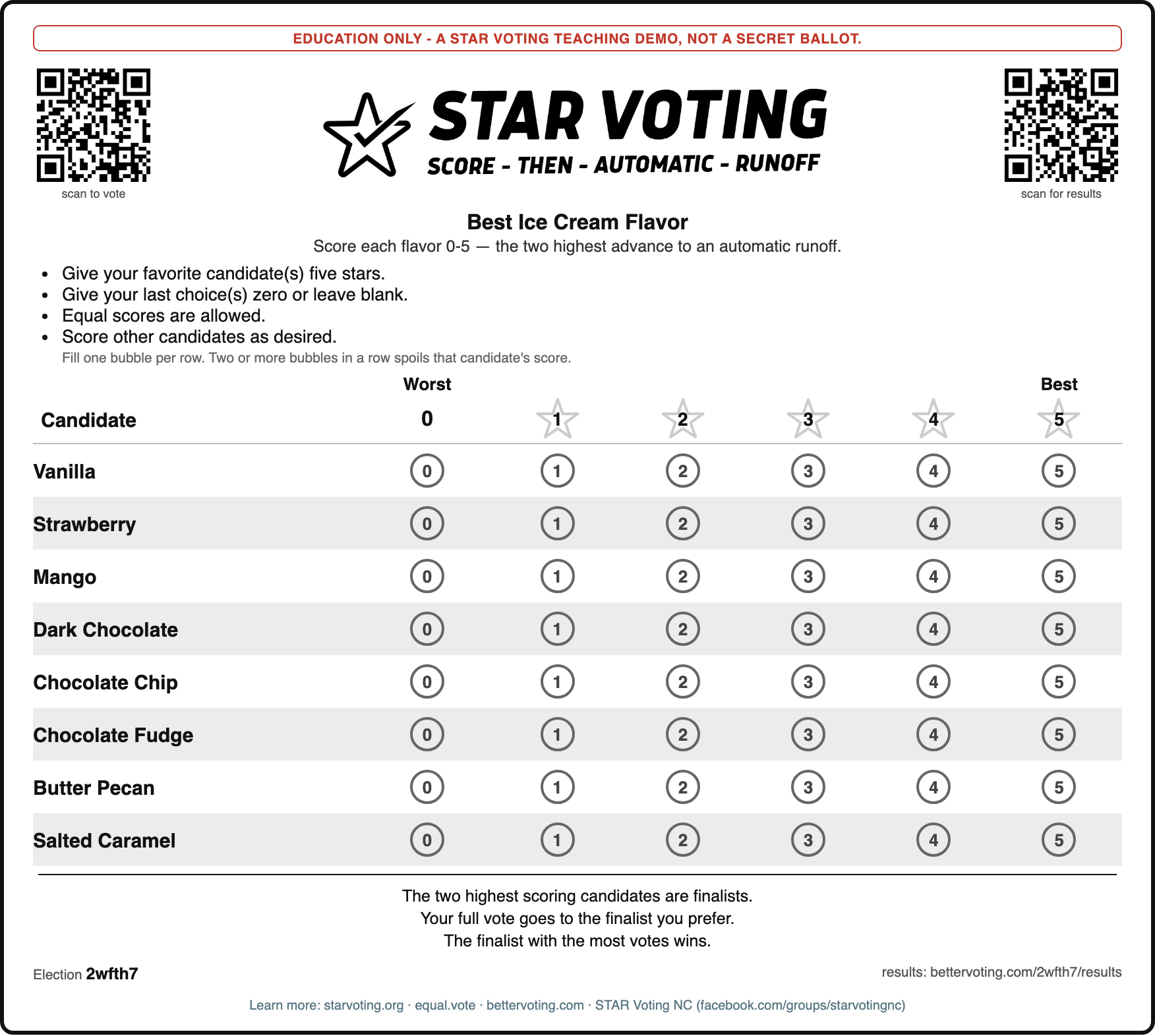
A real generated ballot (the Best Ice Cream Flavor demo, B&W long-form logo). Every element below is configurable — see the checklist.
The loop at a glance¶
  1. Create the election on BetterVoting  ─→  export its JSON
  2. Print ballots from the export         ─→  bv_ballot_sheet.py --bv-export … → PDF
  3. Vote                                   ─→  fill 0–5 bubbles on paper, and/or scan the QR
  4. Hand-count                             ─→  add the columns · runoff (count_star_by_hand)
  5. Compare to BetterVoting                ─→  bettervoting.com/<id>/results
  6. (advanced) scan paper back                ─→  OCR → scores → cast into BV
Key idea: to print ballots you only need the election's candidates + title — never vote data. You're printing blank ballots; the BV export supplies all of it. Votes enter the picture only after people mark them, on the return path (step 6).
Decisions before you print (a quick checklist)¶
Before you run the tool, decide:
- Logo? — none (built-in STAR facsimile), the official B&W
--logo …/BW_long_form.jpg, or your chapter's. (A color chapter logo is for color prints; on B&W keep the chapter as footer text.) - How many copies? —
--copies N(voters + a few spares). - One per page, or packed to save paper? —
--per-page(default 1). - Ballot numbers (serials)? —
--serialsadds "Ballot #N" (a "keep this to verify it was counted" stub — the standard term is a ballot serial/stub number). On for a verifiability lesson or to reconcile the count; off for a plain quick demo. Keep numbers unlinked to voter identity. - Write-in rows? —
--write-ins N. - Promo / chapter footer? —
--promo+--chapter "…". - Copies / layout — the output is always a print-ready PDF (
--out ballots.pdf). - Is the id live? — add
--verify-bvso no one scans a dead QR. - Not created yet? —
--spec NAMEprints a PREVIEW ballot straight from the election spec, before it exists on BetterVoting (add--preview-qrfor a stand-in code if you want to judge the layout with one). A BV election is permanent and can never be edited or deleted, so look at the paper first; the companion check iscreate_bv_test_election.py --dry-run, which shows the exact title, race titles, candidates and description that would be sent (and pings the description's backlink URL).
Step 1 — create the election and export its JSON¶
Create your election at bettervoting.com — or, faster, define it in bv_election_specs.py and run create_bv_test_election.py, which creates the election and saves its JSON to 06_Other/_demo_dropbox/ automatically. Either way you end up with a BV export JSON — that file carries the title, candidates, election id, and descriptions, and it's the only input the ballot tool needs. (For a full export with ballots/results, use the BV UI's export; for printing, the auto-saved config JSON is enough.)
Step 2 — print ballots from the export¶
The tool is STARVote_LH_tabulation_engine/tools_adam/bv_ballot_sheet.py. It has one input route for a real ballot — a BetterVoting export — so there's nothing to hand-type; title, candidates, id, and descriptions all come from the JSON:
python3 STARVote_LH_tabulation_engine/tools_adam/bv_ballot_sheet.py \
    --bv-export "06_Other/_demo_dropbox/<election>-<id>.json" \
    --title "A cleaner ballot title" --serials --verify-bv \
    --logo STARVote_LH_tabulation_engine/tools_adam/assets/BW_long_form.jpg \
    --copies 30 --out ballots.pdf
--title / --question are optional overrides (e.g. a shorter ballot title than the verbose BV one); everything else is output styling. (The old --candidates and --yaml routes were removed — see FSD §5.1.)
Ready-made live elections to demo with — each has a BV export you can print from (and a live results page to check against):
- What Makes the Best Pet? (bettervoting.com/pet) — 7 pets, single-winner STAR, a classroom crowd-pleaser.
- the meta version, bettervoting.com/meta_pets — the same pets voted four ways (Plurality / IRV / Approval / STAR), for a class to see how the method changes the winner. Pair it with Criteria at a glance.
- Bond Brothers Beer Picks (bettervoting.com/yt3232) — 9 Bond Brothers (Cary, NC) beers across the whole spectrum, a crowded-field demo for a meetup.
- Best Ice Cream Flavor (bettervoting.com/2wfth7) — 8 flavors with a 3-flavor chocolate cluster, engineered to show vote-splitting; online write-ins on. (results)
Output — a print-ready PDF (--out ballots.pdf), one ballot per page, straight to the printer. It's rendered from the ballot HTML by headless Chromium, so the playwright library is required (playwright install chromium once); if it's missing the tool tells you the install command. Each ballot carries:
- the race description (if your BV election has one) as the ballot question. The election description is NOT printed by default — it's written for the BV voting page, so it's usually long and often narrates the expected outcome. Pass
--blurb "TEXT"for a blurb of your own, or--blurb-autoto print the export's, - the 0–5 bubble grid (one row per candidate — voters fill one bubble),
- the STAR instructions ("give your favorite 5… the two highest-scoring have an automatic runoff"),
- the BV election id and results URL printed on every ballot, so paper and platform stay linked, and
- one big QR (top right, captioned Scan to vote online) — so a class can vote on paper and online, then compare. It's the only call to action on the sheet; the results URL prints as text in the footer, and
--results-qradds a small results code there if you want one. (QRs use the pure-Pythonsegnolibrary, which is required — a ballot that links to a live election must be scannable; if segno is missing the tool tells you touv pip install segno, or pass--no-qrto skip on purpose.)
The ballot is styled after the official Equal Vote STAR ballot — STAR VOTING header, bulleted instructions, Worst/Best labels, star column headers, digit-in-bubble cells, zebra stripes (in the official ballot grays: bubbles #666, stars #ccc, highlight #ececec), and the "two highest scoring are finalists" footer — so it's instantly familiar to anyone who's seen STAR before.
Add the real STAR logo (optional, recommended). The built-in header is a drawn facsimile so the tool works with no assets. For a polished print run, add the official STAR Voting logo with --logo. Two are bundled in tools_adam/assets/:
- --logo STARVote_LH_tabulation_engine/tools_adam/assets/BW_long_form.jpg — the horizontal lockup (recommended; fits the header cleanly),
- --logo STARVote_LH_tabulation_engine/tools_adam/assets/bw_logo_star.jpg — the round seal (lighter-ink alternative).
These are the Equal Vote Coalition's trademark, included for STAR education/promotion (see assets/README.md for attribution); official brand assets live at starvoting.org.
Recommended setup for a classroom print run — the black-and-white long-form logo on the ballot, and your local chapter in the footer (a color chapter logo like STAR Voting NC's is built for dark backgrounds, so it's an ink-heavy black box on a white ballot — keep the chapter as footer text instead):
python3 STARVote_LH_tabulation_engine/tools_adam/bv_ballot_sheet.py \
    --bv-export path/to/<election>_bv_export.json \
    --copies 30 --serials --promo \
    --chapter "STAR Voting NC (facebook.com/groups/starvotingnc)" \
    --logo STARVote_LH_tabulation_engine/tools_adam/assets/BW_long_form.jpg \
    --out ballots.pdf
Useful flags: --blurb "TEXT" / --blurb-auto (see above), --results-qr (small results code in the footer), --copies N (how many ballots), --per-page N (ballots per printed page — default 1, one per page; bump to 2+ to save paper), --out ballots.pdf, --no-qr, --qr-size PX (vote QR size, default 176), --serials (numbered "receipt" ballots — see Verifiability below), --write-ins N (blank write-in rows), --promo (footer line linking starvoting.org · equal.vote · bettervoting.com), --chapter "TEXT" (append your local chapter), --logo FILE (embed your own SVG/PNG logo in the header, replacing the drawn wordmark), --verify-bv (check the BV id is real; drop the QR/results link if not — see below), and --selftest. Run --help for all of them.
The id always comes from a real, already-created election — that's the point of the single route. Because you print from a BetterVoting export, the QR and …/results link are real by construction. To be safe before a print run, add --verify-bv: it pings BetterVoting to confirm the id resolves and, if it somehow doesn't (a stale or hand-edited export), drops the QR + results link automatically — so no one ever scans a dead link.
Step 3 — vote on paper¶
Hand out the ballots. Each voter fills one bubble per candidate, 0 (worst) to 5 (best); a blank row counts as 0. Equal scores are fine.
Step 4 — hand-count¶
This is the whole point — STAR is genuinely countable by hand:
- Scoring round: add each candidate's column of scores; the two highest totals are the finalists.
- Runoff: sort the ballots into three piles — prefers finalist A, prefers finalist B, no preference — and count the two preference piles.
Full walkthrough: Count a STAR election by hand. Roles for a bigger count (caller / talliers / observer) and the official procedure: Teaching STAR Voting · BetterVoting — Hand Counting STAR.
Step 5 — compare to BetterVoting¶
Have the same voters also vote online (or enter the paper ballots into BV), and confirm your hand tally matches bettervoting.com/<id>/results. The teachable moment: the result is transparent and reproducible — the paper count and the platform agree, and anyone in the room can re-add the numbers.
Paper and online at once — and less work for you¶
The QR makes this a hybrid demo, and that's a feature, not a compromise: some voters fill a paper ballot, others just scan the QR and vote online on the same election. The nice part for the presenter is that it cuts your workload. Online votes need no transcription — BetterVoting tabulates them the instant they're cast — so you can send most of the room to the QR (zero paper handling) and keep just a handful of paper ballots to demonstrate the hand-count. The more people scan, the less scanning and typing you do, and the paper and online votes still land in one tally to compare. (It also reframes Step 6: OCR only ever matters for the paper ballots you choose to keep — every QR voter has already closed the loop.)
Step 6 — after the vote: count via BetterVoting¶
Once the ballots are marked, count via BetterVoting — two complementary ways (do both for the cross-check):
- Hand-count (no computer — the classic lesson). Add the columns, sort the runoff piles, then confirm your tally matches
bettervoting.com/<id>/results. Count a STAR election by hand. - Enter the paper into BetterVoting (so it joins the online tally). Type each ballot on the BV vote page, or cast them via the API (
POST /API/Election/{id}/vote).
The honest catch — reading the paper is manual today. Turning a photo of a ballot into scores is not automated (the OCR tool is roadmap, not built — design in Design notes below). So option 2 begins with a human transcribing the marks using the marker rules below (one bubble → that digit; ≥2 bubbles → spoiled; blank → 0; illegible → flag + note), then entering them into BV.
Folders (repo convention): put BV exports in 06_Other/_demo_dropbox/; photograph the marked ballots into a case's img/ subfolder.
Design notes — the flow, and how a mistake becomes a score¶
The ballot is always tied to a BV election (the export supplies the id), so every ballot prints the id, the results URL, and one big scannable vote QR — paper and platform stay linked. (--results-qr adds a small results code beside the footer URL; it's off by default so the sheet carries a single call to action.) The only time a ballot prints without the QR/results is when --verify-bv finds the id doesn't resolve; then it degrades to a plain STAR ballot so nothing points at a dead link.
Flagging mistakes when you enter a ballot into BetterVoting. An ambiguous mark maps cleanly to a BV score (0–5), with a note for the log:
| On the paper ballot | Meaning | Enter into BV |
|---|---|---|
| exactly one bubble filled in a row | a valid 0–5 score | that digit (e.g. 4) |
| two or more bubbles in one row (e.g. 2, 4 and 5) | ambiguous / overvote | 0 (spoiled — score it 0) + note it in the log |
| no bubble in a row | no score given | 0 (blank) |
| a stray mark, or illegible | can't read it confidently | 0 + a line in the run log for human review |
So "the voter marked 2, 4 and 5 for one candidate" → enter 0 for that candidate and log the ballot for review. The ballot itself warns the voter up front ("two or more bubbles is a spoiled score for that candidate"), so overvotes should be rare.
The OCR tool, respecified in the repo's terms (the goal, not the letter of the original spec):
- Read each ballot image; locate the candidate rows and the 0–5 bubble grid.
- Per row, count filled bubbles → 1 = that score · 0 =
0· ≥2 = spoiled. - Anything below a confidence threshold, or unreadable → flag and log for review.
- Emit a scores table (one scored/marked row per ballot) plus a run log naming every flagged ballot.
- Cast the scores into the BV election (
POST /API/Election/{id}/vote) — they join the online tally. Loop closed.
When that tool gets built, the right way is against a local OCR engine with a synthetic-ballot round-trip self-test (render ballots with known scores → OCR → assert they match), so it's verified before it's trusted on real scans.
Fun extensions (and what they secretly teach)¶
Write-in candidates (--write-ins N). Adds N blank "Write-in: ______" rows with their own 0–5 grid — realistic (BetterVoting supports write-ins too) and easy on paper. The hard part isn't printing them; it's tallying them: the return-path tool has to read a hand-written name and match write-ins across ballots ("Bob" = "bob" = "Bobby"?). So treat write-in matching as a design question for the OCR step, not the ballot.
Ballot receipts & verifiability (--serials). Each ballot gets a number — "Ballot #7 — keep this to verify it was counted." After the count, publish the list of serials that were counted and have each voter confirm theirs is on it. That demonstrates a genuinely important property: counted as cast — you can check your ballot made it into the tally.
But here's the honest catch, and it is the lesson: a serial that anyone can link back to you breaks the secret ballot. If a sign-in sheet maps name → serial, a coercer or vote-buyer could demand your number and check how you voted. That sheet is credentialing — the eligibility check every real election runs — doing its job and then one step too far: the credential's business is establishing that you may vote, and vote once, and it has to stop before it reaches the ballot. Real elections resolve this tension with end-to-end verifiability (E2E-V) — cryptographic receipts that let you confirm your vote was counted without revealing (or being able to prove to anyone) how you voted. So the serial demo is the perfect way to introduce why verifiability is hard: you want both "confirm it counted" and "nobody can tell how I voted," and getting both at once takes real cryptography. (BetterVoting's per-voter unique numbers are the platform's version of this receipt.)
For a classroom: use serials to show "counted as cast," then ask "what would go wrong if we posted a name-to-number list?" — that discussion is the actual education. Keep serials unlinked to identity in any real use.
Every ballot says so, in print. Because a numbered ballot invites an immediate (and correct) objection — "wait, that breaks the secret ballot!" — the tool prints a standing notice on every ballot by default: "EDUCATION ONLY — a STAR Voting teaching demo, not a secret ballot." That's what lets the serial be a teaching device instead of a red flag: the ballot itself declares it's a demo. Change the wording with --notice "...", or drop it with --no-notice (not recommended — it's the thing that heads off the objection).
Should you number the ballots? (--serials is off by default)¶
Numbering cuts both ways, so it's a deliberate choice — here's how to make it:
Number them (--serials) when… |
Leave them unnumbered (default) when… |
|---|---|
| verifiability is the lesson — you want to demonstrate "counted as cast" and then discuss the secret-ballot tension | the point is how STAR works (score → runoff) and a numbering tangent would distract |
| you want to reconcile the count ("all 30 ballots back, none duplicated") | the room is mixed/adult and a numbered ballot would trigger objections before you're ready to teach them |
| — | you might reuse the ballots casually later (no privacy footgun) |
Why off by default: a default is used by whoever isn't thinking about it, and a serial only pays off when it's paired with the discussion ("what would break if we posted a name→number list?"). So the tool keeps the clean, on-topic ballot as the default and makes numbering a conscious opt-in — when you type --serials, that's your cue to actually teach the verifiability lesson (and to keep the numbers unlinked to any name). Teaching verifiability? Reach for --serials. Otherwise the plain ballot is the right call.
Scope note (so nobody rabbit-holes this): the whole serial demo runs on paper + hand-count — print serialized ballots, count them, publish the list of counted serials. You don't need BetterVoting or any digital plumbing for it, and you shouldn't try to thread serials through BV's vote API (it doesn't carry them, and it isn't needed). A genuinely digital verifiable count is end-to-end verifiability (E2E-V) — a cryptography topic beyond this teaching repo. The lesson is already complete on paper; stop there.
Why do this (the teaching value)¶
- Demystifies the method — students see that STAR is simple to count, not a black box.
- Two independent counts that agree — the paper hand-count and BetterVoting's tally — which is exactly the trust story ("don't believe it, check it").
- Perfect for classrooms, clubs, and workshops — everyone participates, and the result is theirs to verify.
See also¶
- Teaching STAR Voting — the presenter's guide (arc, terms, misconceptions)
- Count a STAR election by hand · Summability — why it scales
- BetterVoting and the LH engine — one election, two reports — the digital cross-check