BV250 — Manage Voters / Add Voters
- BetterVoting - test cases — the canonical roster
- BetterVoting BPML - Use Case List — needs a Manage Voters / Add Voters entry; see "BPML" below
- Subsystem map:
analysis/manage-voters-map.md - Upstream: #1512 (scroll) · #1513 (duplicate key) — analysis:
issues/add-voters-duplicate-check-keys-on-email.md - Draft user documentation out of the same source reading:
docs_proposals/help/voter_list.md - After the fixes land, run
BV250-post-fix-verification.md— the acceptance list, the user stories behind it, and the traps a plausible fix falls into - video: the reporter's, on #1512 — https://github.com/user-attachments/assets/effc8f69-9e02-4473-8e18-c547beb42136
Sheet rows still needed.
BV250was allocated as the next free family afterBV240(preliminary-results disclaimer) — it is not yet a row in the test-case sheet. Paste-ready:BV250-sheet-rows.tsv. If it collides with an existing row, renumber here and in the tsv together.
Scope
Everything on the Manage Voters screen of a closed-list election and the Adding Voters dialog it opens: the access radios and what locks them, the roll submission path (typed and CSV), the duplicate handling, and the mobile behaviour of the dialog itself.
Out of scope: email invitations and the Draft Email Blast (SendEmailDialog), voter authentication
at ballot time, and anything about how ballots are counted.
Status for all 11: Ready to run. Nothing here waits on an unmerged feature. Two of them (BV250a, BV250b) are expected to fail today and are written as baseline captures — see the column below.
Test elections needed (3 configurations)
| Cfg | State | Voter access | Identification | Used by |
|---|---|---|---|---|
| V1 | draft | closed (pre-defined list = Yes) | Admin-managed voter IDs | a, b, c, d, e, g, h, i, j, k |
| V2 | draft | closed | BetterVoting-managed voter IDs (email) | b (email arm), f |
| V3 | finalized / open | closed, admin-managed, roll already populated | — | e (the non-draft arm) |
Notes on setup:
- Adding the first voter is a one-way door on a non-draft election. Both radio groups disable on
state !== 'draft' || rolls.length > 0(ViewElectionRolls.tsx:119,:145), and CLEAR VOTER LIST only exists while the election is a draft. So V1 is consumed by any case that adds a voter — make a fresh draft per run, or clear the roll between cases. - Method, candidates and races are irrelevant to every case here. Use the smallest template.
- BV250h and BV250i are the mobile cases and need a real narrow viewport: a phone, or devtools at 360 x 780 with touch emulation. A desktop window narrowed to 360 px does not reproduce the auto-hiding overlay scrollbar that made the reporter's session confusing.
- Test accounts: the sheet's testing-credentials tab, not here.
Tier 1 — the duplicate path (the two that fail today)
BV250a — a voter-ID list of two rows is reported as duplicate emails
Cfg: V1 · Automate: y · Expect: FAIL today
- On Manage Voters, confirm Yes to a pre-defined voter list and Admin-managed voter IDs. Leave the Email checkbox unticked.
- ADD VOTERS.
- Type two distinct voter IDs, one per row:
alpha bravo - SUBMIT.
Expected: the two voters are added. No prompt.
Actual today: "You entered duplicate emails, which is not supported. Would you like us to remove
duplicates?" — naming a field that is not in use and contains nothing. Root cause: both
duplicatesExist and removeDuplicates key on roll.email, which is undefined for every row in
this mode, so all rows collide on "".
→ full page: BV250a-voter-id-list-flagged-as-duplicate-emails.md
BV250b — answering YES adds one voter and discards the rest, silently
Cfg: V1 · Automate: y · Expect: FAIL today
- As BV250a, but submit three distinct IDs and note the roll count before you start.
- Answer YES to the duplicate prompt.
- Count the roll.
Expected: three voters added; if the tool really did remove duplicates it says how many.
Actual today: the roll grows by one. Two rows are dropped with no message and no count. Observed in the reporter's video as 2 → 3 → 4 → 5 across submissions of 3, 2 and 1 rows.
Second arm (V2, email mode): the same three-row submission with distinct emails is expected to pass — the key is correct there. Run both arms; the contrast is the diagnosis.
→ full page: BV250b-duplicate-removal-discards-rows.md
BV250c — answering NO adds nothing and says nothing
Cfg: V1 · Automate: y
→ full page: BV250c-answering-no-adds-nothing.md
- As BV250a. Answer NO.
- Look at the roll and at the dialog.
Expected: either the voters are added, or the admin is told plainly that nothing was added and why.
Predicted actual (from source, AddElectionRoll.tsx:99): onSubmit returns without posting; the
dialog stays open with the text still in it and no message. So the two answers on offer are "add one
voter" and "add none". Marked as a prediction — confirm in the browser.
BV250d — a genuinely duplicated voter ID is caught
Cfg: V1 · Automate: y
→ full page: BV250d-genuine-duplicate-is-caught.md
Submit alpha / bravo / alpha. Expected: the prompt fires (it should, here), and YES adds
two voters. This is the case that has to keep passing after the key is fixed — it is the reason
the check exists.
Tier 2 — input format and column handling
BV250e — the roll table reflects exactly what was submitted
Cfg: V1 then V3 · Automate: y
→ full page: BV250e-roll-table-reflects-submission.md
Submit a known list, then read the Voters table back. Expected: same count, same IDs, all rows
Not Voted. On V3 (finalized) additionally confirm the access radios are disabled and
CLEAR VOTER LIST is absent — the lock is only undoable in draft.
BV250f — two ticked columns require a comma per row
Cfg: V2 · Automate: y
→ full page: BV250f-two-columns-require-a-comma.md
Tick both Voter ID and Email, then submit a row with no comma.
Expected: the error names the format. Actual today: the snackbar reads
Incorrect number of columns: <row> and the dialog's own instruction line only says
"(1 voter per row, no spaces)", never that the row is comma-separated. Assert on the requirement
(the admin can tell what to type next), not on the literal string.
BV250g — CSV import takes the same path
Cfg: V1 · Automate: n
→ full page: BV250g-csv-import-takes-the-same-path.md
Load a CSV with header voter_id and three distinct rows. Expected: three voters.
Predicted actual: the same duplicate prompt and the same one-row outcome — handleLoadCsv
(:137, :146) calls the identical pair of functions. Prediction; confirm. Also check the two
documented guards: a bad header (Invalid headers) and a non-text file (Invalid data type) both
alert() rather than using the snackbar, which is inconsistent with every other error on this screen.
Tier 3 — the dialog on a phone (this is #1512's territory)
BV250h — the Adding Voters dialog scrolls itself, not the page
Cfg: V1, narrow viewport · Automate: n
→ full page: BV250h-add-voters-dialog-scrolls-itself.md
- Open ADD VOTERS on a 360 px-wide viewport.
- Note where the page behind the modal is scrolled to.
- Scroll inside the dialog; press SUBMIT with the field empty.
Expected: any feedback appears without the admin hunting for it, and the page behind the modal does not move.
Actual today: the background does move (visible in the reporter's video at 18–20 s). Note this
dialog has no scroll-to-error of its own — its failures go to a snackbar at the bottom of the
viewport, which can land over the dialog's own buttons. So a fix to scrollToElement for #1512
does not fix this screen; check both.
BV250i — the race dialog scrolls to its error, on a phone
Cfg: any draft election, narrow viewport · Automate: n · Expect: FAIL today
→ full page: BV250i-race-dialog-scrolls-to-its-error.md
The case that matches #1512's written steps. Add a race, give it a title and one candidate only, press SAVE.
Expected: the dialog scrolls its own content so "Must have at least 2 candidates" is visible.
Actual today: the dialog does not move; the page behind it does.
→ issues/1512-scroll-save-review.md
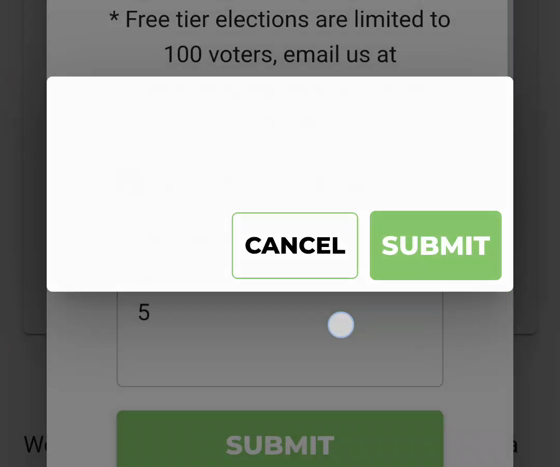
BV250j — the confirm dialog is never blank
Cfg: V1, narrow viewport or a throttled CPU · Automate: n
→ full page: BV250j-confirm-dialog-is-never-blank.md
Trigger any confirm on this screen (CLEAR VOTER LIST is the easiest) and watch it close.
Expected: the box carries its text and its own button labels for as long as it is on screen.
Actual today: ConfirmationDialogProvider.tsx:46 clears title, message and both labels
synchronously with isOpen: false, so the fade-out renders an empty box with the default
CANCEL / SUBMIT labels. Caught three times in a 40-second recording on a mid-range Android.
Cosmetic, but it is why a tester's screenshot can show a confirm dialog with nothing in it.
BV250k — the voter table fits the viewport
Cfg: V1 with 3+ voters, narrow viewport · Automate: n
→ full page: BV250k-voter-table-fits-the-viewport.md
Expected: Voter ID / Email / Has Voted and the Rows per page … 1–N of N footer are all
reachable without horizontal page scrolling.
Actual today: the table is clipped at the right edge with its own horizontal scrollbar and the
footer runs off-screen. Layout only. Check for a duplicate before filing — plausibly already
covered by #704 or
#1170.
Which of these actually catch bugs
BV250a and BV250b (the duplicate key — silent data loss, unfiled), BV250c (the NO branch), BV250g (the CSV twin of the same bug), BV250i (#1512 as written). The other six are confirmation and boundary.
BPML
The Use Case List has no entry for this flow. Suggested rows, in the order an admin meets them:
| Use case | Actor | Trigger | Notes |
|---|---|---|---|
| Restrict an election to a pre-defined voter list | Election admin | Manage Voters | One-way door once a voter exists; undoable only in draft |
| Choose voter identification (BV-managed vs admin-managed IDs) | Election admin | Manage Voters | Locks with the above |
| Add voters to the roll (typed) | Election admin | ADD VOTERS | The BV250a/b failure lives here |
| Add voters to the roll (CSV import) | Election admin | ADD VOTERS | Same code path, different entry |
| Clear the voter list | Election admin | CLEAR VOTER LIST | Draft only; the unlock mechanism |
| Review roll and voting status | Election admin | Voters table | Has Voted column |
| Invite voters by email | Election admin | DRAFT EMAIL BLAST | Email mode only — out of BV250's scope, own family |
Open questions
- Which screen is #1512 for? Its steps and its video disagree (race dialog vs Adding Voters). Needs a call from whoever picks it up.
- Should a partial roll submission be possible at all? Today YES posts a silently truncated list. Rejecting the whole submission and telling the admin which rows collided is arguably the safer contract for a voter roll — worth asking before the fix is written, because it changes it.
- Should
Add Votersbe reachable at all once the election is finalized? It is, and it still adds voters — but the settings it locks can no longer be unlocked. Deliberate, or a gap?