Binary is a verdict, not a property
Level: 101 → 201 · for anyone with a terminal
One line: Nothing in a file says binary: every reader brings its own test, so the three bytes c0 ff ee are an error to a UTF-8 decoder, three letters to Latin-1 and plain text to file, grep and git — and renaming the file changes none of those verdicts, only which app a Mac opens it with, where .bin means MacBinary archive.
printf '\xc0\xff\xee' > output.bin      # bash, zsh, fish; a portable sh wants '\300\377\356'
cp output.bin output.txt
cmp output.bin output.txt && echo same  # same
Two names, one set of bytes. A filename is kept in the directory, not in the file, so the only place binary could be written down is in the bytes themselves — and bytes are only numbers. Binary is something a reader concludes about them, each reader concludes it by its own test, and the name is an input to exactly one of those tests.
The page uses c0 ff ee rather than a member of the cast because the property it needs is bytes that spell no character at all in UTF-8 — and these three fail for three different reasons, which the Python example takes apart.
Who calls it what
Every row was measured on the same three bytes. The shell and Python examples below reproduce all but the last two, which need a real git and a Mac.
| Who reads it | The test it applies | Verdict on c0 ff ee |
|---|---|---|
a UTF-8 decoder — open(p, encoding="utf-8"), Rust's read_to_string, iconv -f UTF-8 |
every sequence must be well-formed UTF-8 | not text — it fails at byte 0 |
| a Latin-1 or Windows-1252 decoder | none: each of these bytes is a letter | text: Àÿî |
| a Mac OS Roman decoder — the table TextEdit falls back to | none | text: ¿ˇÓ |
file --mime-encoding |
its magic database, then valid UTF-8? a plausible ISO-8859? | text: iso-8859-1 |
grep, in the C locale |
a NUL byte | text |
git diff |
a NUL byte in the first 8,000 | text |
| the Finder | the name | whatever the extension says — below |
Only the first row refuses these bytes, and it refuses them as UTF-8 — a verdict about one encoding, not about the file. Every 8-bit table finds a character for each byte: Latin-1 maps all 256 byte values to characters, so under Latin-1 no file can fail to decode, which is precisely why Latin-1 can never tell you that a file is binary.
The tools whose job is to call a file binary lean on one byte above all — 00, the byte that ends a string in C. It is git's entire test and grep's first one, and file gives up on it too — though file's list is longer: a lone 01, with no NUL anywhere, is enough to make it answer binary where git and grep see text, and file guesses has the whole list. That is also why all three call a BOM-less UTF-16 file binary: in UTF-16 every ASCII letter carries a 00.
grep is the row that moves. In a UTF-8 locale, a line that is not valid UTF-8 changes what both greps do, in opposite styles:
                          LC_ALL=C          LC_ALL=en_US.UTF-8                   -c, UTF-8
BSD  grep line f          lines 1, 2, 3     lines 1 and 3, nothing on stderr     2
BSD  grep -a line f       lines 1, 2, 3     lines 1 and 3, nothing on stderr     2
GNU  grep line f          lines 1, 2, 3     lines 1 and 3, then on stderr:       3
                                            grep: f: binary file matches
GNU  grep -a line f       lines 1, 2, 3     lines 1, 2, 3                        3
By default both greps leave line 2 out, and only one of them tells you. GNU found it — -c counts three — and withheld it, because printing bytes that are not valid in your locale is part of GNU's definition of binary; -a puts it back. BSD never counted it, -a changes nothing, and whether BSD sees that line at all depends on the pattern: grep bad, which matches the line's first three characters, finds it, while grep line, grep ' ' and grep 'bad.*line' do not. grep on text that is not ASCII has the full comparison, and the advice that follows from it: search a file of unknown encoding under LC_ALL=C, where every row in the table above says text.
Why UTF-8 is the one that can say no
A single-byte table is a list of 256 characters, so it cannot fail. UTF-8 is built the other way round: the leading bits of a byte announce how long the sequence is, every byte after the first must begin 10, and whole ranges of lead bytes are forbidden outright. Most byte strings break one of those rules within a few bytes, which is what makes not valid UTF-8 such a strong hint in practice. UTF-8 by hand has the rules; Validation is a boundary has where the check runs.
c0 ff ee breaks three different rules, one per byte:
c0announces a two-byte sequence, but a two-byte sequence startingc0can only spellU+0000–U+003F, which ASCII already spells in one byte. That is an overlong form, soc0is never valid anywhere.ffhas eight leading 1 bits, and no UTF-8 sequence starts with more than four.eeis a perfectly good start of a three-byte sequence — and the file ends.
So errors="replace" gives three U+FFFD, one for each byte. And notice what the rules do not forbid: a NUL is valid UTF-8, since it is the character U+0000. A file of 00 bytes passes any UTF-8 decoder and is the one file grep, git and file all call binary. Binary and not UTF-8 are different questions, and the kata turns on it.
What the name changes on a Mac
macOS picks the application for a double-click through Launch Services, which reads the file's extension, maps it to a Uniform Type Identifier (UTI) — public.plain-text, public.png — and hands the file to whichever app has registered for that type. It does not open the file.
name          UTI                            Kind                   opens in
output.txt    public.plain-text              Plain Text Document    the default text editor
output.bin    com.apple.macbinary-archive    MacBinary archive      Archive Utility
output.raw    com.panasonic.raw-image        Panasonic raw image    Photos
output.dat    dyn.ah62d4rv4ge80k2py          DAT file               whatever claims .dat
output.hex    dyn.ah62d4rv4ge80u3p2          Document               nothing
output        public.data                    Document               TextEdit
runme         public.unix-executable         Unix Executable File   Terminal     (no extension, chmod +x)
photo.txt     public.plain-text              Plain Text Document    the default text editor   (a real PNG inside)
note.png      public.png                     PNG image              Preview      (plain text inside)
The default text editor is TextEdit on a new Mac; on the one measured, its owner had pointed public.plain-text at another editor, which is exactly what that column is for. .dat and .hex have no type of their own — dyn.… is a dynamic UTI, minted from the extension on the spot — so what opens them depends on what is installed. The machine measured had VLC, which declares .dat among the document types it opens; nothing on it claimed .hex.
Four things to read off that table.
.bin does not mean raw bytes to a Mac. It means MacBinary — a 1985 format that packed a classic Mac file's two forks and its Finder metadata into one stream, so the file could survive a trip through systems that had nowhere to keep them (Wikipedia ↗). .bin was its extension, the system still maps the extension to it, and Archive Utility is registered to unpack it. So a double-click on output.bin sends three bytes that were never packed to an unpacker. macOS's own tool agrees that they are not MacBinary:
$ macbinary probe output.bin; echo $?
29                                              ← not MacBinary
$ printf 'plain text\n' > real.txt && macbinary encode real.txt
$ macbinary probe real.txt.bin; echo $?
0
$ xxd real.txt.bin | head -1
00000000: 0008 7265 616c 2e74 7874 0000 0000 0000  ..real.txt......
A real MacBinary file is 128 bytes of header — the name, the Finder type and creator, the two fork lengths — and then the forks, so eleven bytes of text became 256. .raw is no safer as a name for raw bytes: the system declares it a Panasonic camera-raw image, and Photos claims it.
Content is never read. A real PNG named photo.txt goes to the text editor, and plain text named note.png goes to Preview. A PNG with no extension is public.data and opens in TextEdit, not Preview: unlike the Linux desktops in File type is four questions, Launch Services has no magic-number fallback at all.
Two pieces of metadata do count, and neither is content. An extensionless file with its execute bit set becomes public.unix-executable and goes to Terminal. And a file carrying a classic Finder type code in its com.apple.FinderInfo extended attribute is typed by that code: an extensionless file stamped TEXT becomes com.apple.traditional-mac-plain-text, Kind SimpleText Document. That is the pre-extension Mac way of recording a file's type — exactly the metadata MacBinary existed to carry across.
A missing extension is not a guess that the file is text. output opens in TextEdit because TextEdit registers as a viewer for public.data, the type of anything with no better name — which is why the extensionless PNG opens there too.
What TextEdit shows you
So the name decides which app gets the bytes, and the app then has to decide what they are. A text editor facing bytes that are not valid UTF-8 does not refuse: it falls back to an 8-bit table and shows you whatever letters that table has.
$ textutil -convert txt -encoding UTF-8 -stdout output.txt | xxd -p
c2bfcb87c393        ¿ˇÓ   U+00BF U+02C7 U+00D3   Mac OS Roman

Sublime Text        "fallback_encoding": "Western (Windows 1252)"
                    Àÿî   U+00C0 U+00FF U+00EE   Windows-1252
Two editors, two different wrong answers, and neither one refuses. Which of them you see depends on which app owns .txt on your Mac — the previous section — so a rename that was meant to protect the file decides, instead, which mojibake you get.
In the terminal
Verified output of binary_or_text_sh.sh — regenerated by tools/run_examples.py, never hand-typed.
1. THE NAME IS NOT IN THE BYTES
   output.bin  c0 ff ee   3 bytes
   output.txt  c0 ff ee   3 bytes
   output.dat  c0 ff ee   3 bytes
   output      c0 ff ee   3 bytes
   cmp finds no difference between any of them.
   Four names, one set of bytes. A filename is kept in the directory,
   not in the file, so nothing that reads the file can see it.

2. file(1) READS THE BYTES - AND CALLS THEM TEXT
   output.bin  text/plain  iso-8859-1
   output.txt  text/plain  iso-8859-1
   output.dat  text/plain  iso-8859-1
   output      text/plain  iso-8859-1
   The same answer four times, because the name is not an input to
   file(1). And the answer is text: iso-8859-1 means 'high bytes, not
   UTF-8, so some 8-bit table' - and in Latin-1, c0, ff and ee are
   three ordinary letters.

3. A READER THAT INSISTS ON UTF-8 SAYS NO
   iconv -f UTF-8 -t UTF-8 < output.bin      exit 1
   Non-zero: these bytes are not UTF-8. Of the readers in this script it
   is the only one that objects, and its objection is about one
   encoding, not about the file.

4. THREE 8-BIT TABLES, THREE READINGS, NO REFUSALS
   read as ISO-8859-1  Àÿî   written back out as UTF-8: c3 80 c3 bf c3 ae
   read as CP1252      Àÿî   written back out as UTF-8: c3 80 c3 bf c3 ae
   read as MACINTOSH   ¿ˇÓ   written back out as UTF-8: c2 bf cb 87 c3 93
   Latin-1 and Windows-1252 agree on all three bytes, and Mac OS Roman
   disagrees with them on every one. None of the three refused: each
   found a character for every byte, so none of them can call a file
   binary.

5. THE BYTE THAT DOES MAKE A FILE BINARY, TO grep AND file(1)
   output.bin  c0 ff ee     grep -I: text    valid UTF-8: no   file(1): iso-8859-1
   nul.txt     61 00 62 0a  grep -I: binary  valid UTF-8: yes  file(1): binary
   nul.txt is valid UTF-8 - a NUL is the character U+0000 - and it is
   the one grep and file(1) call binary. output.bin is not UTF-8 at all,
   and both of them call it text. 'Binary' and 'not UTF-8' are two
   different questions: a decoder asks the second, and grep asks the
   first - which, in the C locale this script runs in, is a question
   about one byte value, 00.
Section 2 is the surprise. file — the tool whose whole job is saying what a file is — calls these bytes text four times, and never sees a name. Section 5 is the distinction the page turns on: the file with a NUL in it is valid UTF-8 and is binary to both tools; the file that is not UTF-8 at all is text to both — in the C locale the example runs in, which is the locale the grep table above says to search in.
In Python
Verified output of binary_or_text_py.py — regenerated by tools/run_examples.py, never hand-typed.
1. ONE SET OF BYTES, SIX READINGS
   the bytes              c0 ff ee
   utf-8, strict          UnicodeDecodeError at byte 0
   utf-8, replace         3 of 3 characters are U+FFFD
   latin-1                Àÿî   U+00C0 U+00FF U+00EE
   cp1252                 Àÿî   U+00C0 U+00FF U+00EE
   mac_roman              ¿ˇÓ   U+00BF U+02C7 U+00D3
   git's rule             text - is there a NUL in the first 8000 bytes?
   Strict UTF-8 refuses at the first byte. 'replace' keeps going and
   keeps nothing. The three 8-bit tables each find three characters
   and disagree about which. git's rule never decodes anything at all.
   Latin-1 maps all 256 byte values to characters, so under Latin-1
   no file can fail to decode - which is exactly why it cannot tell you
   that a file is binary.

2. WHY UTF-8 SAYS NO - A DIFFERENT REASON FOR EACH BYTE
   byte  bits      leading 1s  verdict
   c0    11000000  2           overlong - it could only spell U+0000..U+003F
   ff    11111111  8           never valid - no sequence starts with more than four 1s
   ee    11101110  3           truncated - needs 2 continuation bytes, the file ends
   Three bytes, three different failures, and 'replace' puts one U+FFFD
   in place of each - the three that section 1 counted. A random byte
   string almost never gets past these rules, which is what makes 'not
   UTF-8' such a strong hint. It is still a hint about one encoding.

3. THE NAME IS A LABEL - THE MODE IS THE DECLARATION
   written under 4 names with 'wb', read back with 'rb': all identical? True
   open('output.txt', 'rb').read()          -> b'\xc0\xff\xee'
   open('output.txt', encoding='utf-8')     -> UnicodeDecodeError
   open('output.txt', encoding='latin-1')   -> 'Àÿî'
   open(..., 'w').write(<bytes>)            -> TypeError
   open(..., 'wb').write(<str>)             -> TypeError
   The file is called output.txt and Python did not care: 'rb' handed
   back bytes, utf-8 refused, latin-1 found three letters, and each
   write failed on a TYPE, never on a name. Every line would read the
   same for output.bin. The b in the mode is what makes a file binary
   to Python; the extension is a note for the next person to read it.

4. A .hex FILE IS USUALLY TEXT THAT DESCRIBES BYTES
   :03000000C0FFEE50    count, address, type 00 (data), the data, checksum
   :00000001FF          type 01: end of file
   30 bytes, highest byte 0x46, valid UTF-8: True
   That is Intel HEX, the format most .hex files hold. The same three
   bytes of data, spelled as ASCII with an address and a checksum - so
   every reader in section 1 would call this file text.
Section 3 is the part of the usual advice that holds up. In a program a file is binary because you opened it 'rb', and the name plays no part: 'rb' hands back bytes from output.txt, and each wrong write fails on a type — bytes into a text file, str into a binary one — never on a name. So .bin is a note to the next person, not an instruction to the program, and that is a perfectly good reason to use it. Section 4 is what most .hex files hold: Intel HEX, where the same three bytes become two lines of ASCII with an address and a checksum — a text file describing binary data.
In Rust
Verified output of binary_or_text_rs.rs — regenerated by tools/run_examples.py, never hand-typed.
1. File::create WRITES BYTES, WHATEVER THE NAME SAYS
   wrote c0 ff ee to output.txt; fs::read returns c0 ff ee
   No mode was asked for, and there is none to ask for: a File is
   bytes in and bytes out, whatever its name.

2. ASKING FOR A String IS ASKING 'IS THIS UTF-8?'
   fs::read_to_string -> Err, kind InvalidData
   str::from_utf8     -> Err, valid_up_to 0, error_len Some(1)
   valid_up_to 0: not one byte of it is UTF-8. error_len Some(1): the
   first bad sequence is one byte long - the c0 on its own.

3. from_utf8_lossy SAYS YES BY REPLACING
   3 chars, 3 of them U+FFFD, 9 bytes: ef bf bd ef bf bd ef bf bd
   Three bytes in, nine out, and nothing of the original left in them.

4. LATIN-1 IS THE TABLE WHERE `b as char` IS THE WHOLE DECODER
   "Àÿî"   U+00C0 U+00FF U+00EE
   fs::write of that String -> c3 80 c3 bf c3 ae
   Every u8 is a char under Latin-1, so this step cannot fail. Written
   back, the three letters are six bytes, because a String is UTF-8.
Rust has no 'wb' because it has no text mode: a File moves bytes in both directions, and the only place Rust asks is this text? is where you ask for a String — read_to_string, String::from_utf8 — which is always the same UTF-8 check, and says InvalidData for c0 ff ee whatever the file is called. From UTF-8, and lossy has the three ways past that check.
git asks one question, about one byte
$ git add coffee.bin nul.txt utf8.dat && git diff --cached --numstat
1       0       coffee.bin        ← c0 ff ee: text, one line added
-       -       nul.txt           ← 78 00 79: binary, no line count
1       0       utf8.dat          ← café in UTF-8: text
git calls a file binary when a NUL appears in its first 8,000 bytes, and for no other reason — the whole test is buffer_is_binary() in git's xdiff-interface.c, a search for a zero byte over FIRST_FEW_BYTES, which is 8000. So c0 ff ee gets a line diff, and so does any .bin without a NUL near its start — unless .gitattributes says *.bin binary, which is how you tell git what the extension could not.
Which name, then
The usual advice is right that a name is a message. It is a message to people, and to one part of a Mac.
| Name | What it promises | What a Mac does with it |
|---|---|---|
.txt |
text — in an encoding it does not name | your text editor, which has to guess the encoding |
.bin |
by convention, bytes in no particular format: firmware, a disk image, a dump | MacBinary archive → Archive Utility |
.raw |
by convention, headerless samples or pixels | Panasonic camera raw image → Photos |
.dat |
nothing at all | no type of its own; whichever app claims it |
.hex |
usually Intel HEX — ASCII lines that describe bytes, with addresses and checksums, so a text file | no type of its own |
| none | nothing | public.data → TextEdit |
If the bytes have a format, the format's own extension is the honest name: a PNG is binary and is called .png, never .bin. If they have none, .bin is the convention and a fine one — every program ignores it and every person reads it correctly. Just do not expect a double-click to honour it, and do not expect .txt to tell anyone the encoding.
Looking at the bytes
A text editor is the wrong tool for a file whose verdict you do not know, because it will pick a table and show you letters. Use a dump — xxd in the terminal:
— or a hex editor. The usual free one on a Mac is Hex Fiend ↗: brew install --cask hex-fiend, which also puts a hexf command on your path, so hexf output.bin opens the file in it. It is BSD-2-Clause, created by Peter Ammon and maintained today by Kevin Wojniak, whose Developer ID signs the releases. It edits in place — inserting and deleting, not only overwriting — opens files far larger than memory, and compares two files. Here is output.bin in it:
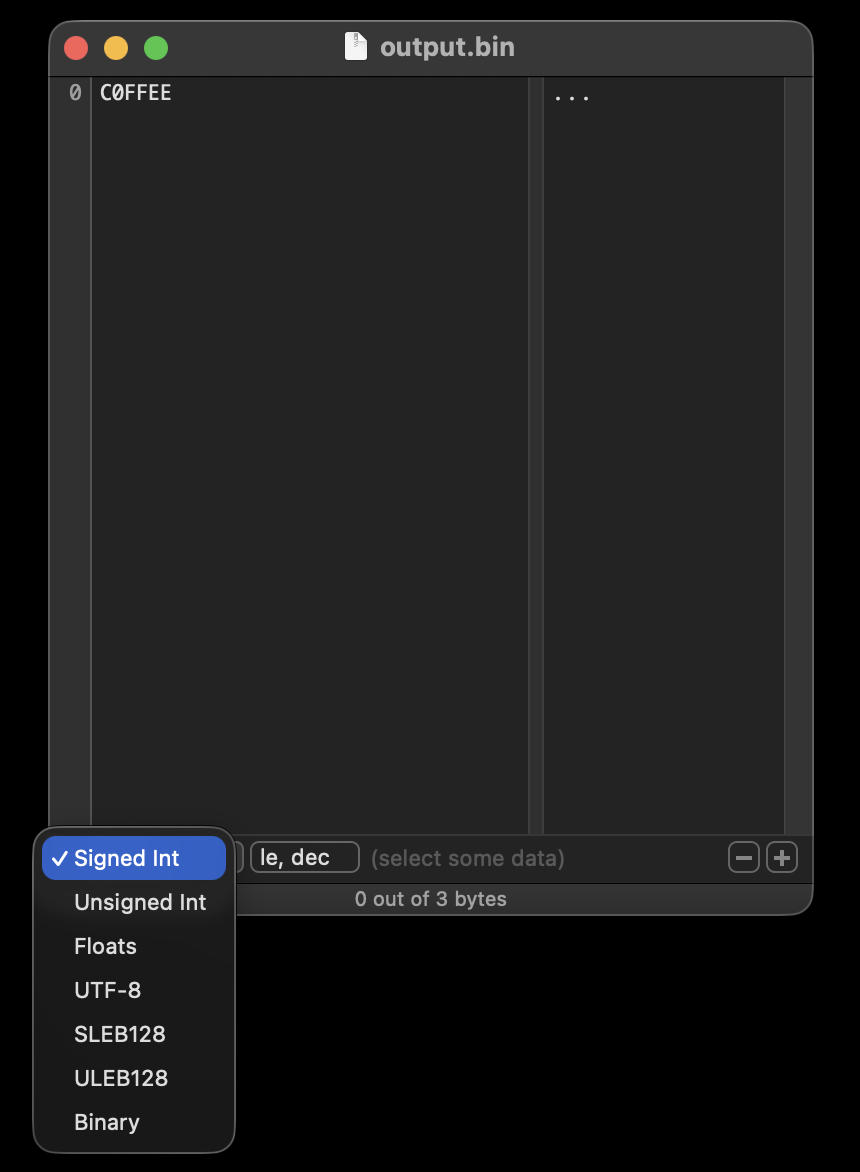
Read it the way Reading a hex dump reads xxd: column by column, asking which ones are the file.
0is the offset of the row — the tool's bookkeeping, not the file.C0FFEEis the file: its three bytes in hex, with no table involved....is the tool's guess. The text column starts out in Western (ASCII), andc0,ffandeeare all above7f, so each is drawn as a dot — the answerxxdgives too. Unlikexxd's, this guess is a setting: the Text Encoding menu offers Central European (ISO Latin 2), Unicode (UTF-16BE), Unicode (UTF-16LE), Western (ASCII), Western (ISO Latin 1) and Western (Mac OS Roman), plus Customize…, which opens a searchable list of macOS's own encodings — Unicode (UTF-8) among them — to add to that menu. Switch to Mac OS Roman and the same three bytes read¿ˇÓ— TextEdit's mojibake, produced on purpose. The hex column does not move.- The bottom row is the data inspector, which reads whatever bytes you select as a value. The open menu is its list of readings: Signed Int, Unsigned Int, Floats, UTF-8, SLEB128, ULEB128 and Binary.
le, decmeans little-endian, shown in decimal, and (select some data) is there because nothing is selected yet — which is also what the status bar's 0 out of 3 bytes says. SLEB128 and ULEB128 are the variable-length integers DWARF and WebAssembly use: each byte's top bit means another byte follows, where UTF-8 announces the whole length in its lead byte instead. By LEB128's rulec0 ff eeis unfinished too, since all three bytes have their top bit set.
Measured 2026-09-10 with Hex Fiend 2.18.1 on macOS 26.6.2: the screenshot, the Text Encoding menu's entries, UTF-8 in the Customize… list, and the Mac OS Roman reading. The editing, huge-file and compare features are from its README ↗.
If you are coming from Python or ABAP
Python. The mode is the declaration, and the name is not an input: open(p, 'rb') hands you bytes from a file called notes.txt, and open(p, encoding='utf-8') tries to decode one called firmware.bin. The one standard-library function that does read the name is mimetypes.guess_type(), and it is the Finder's logic in miniature — a table keyed on the extension that never opens the file (File type is four questions shows it being wrong). And bytes.decode('latin-1') cannot fail, which makes it a way to avoid a UnicodeDecodeError, never a way to learn what the bytes meant.
ABAP. OPEN DATASET … IN BINARY MODE against IN TEXT MODE ENCODING UTF-8 is Python's 'rb' against encoding='utf-8': the program declares, and the dataset name is a path and nothing more. Text mode is where the check happens — bytes that are invalid in the named encoding raise CX_SY_CONVERSION_CODEPAGE unless the statement says IGNORING CONVERSION ERRORS — while binary mode hands you an xstring and checks nothing, which is the 'rb' promise exactly. The same shape runs through GUI_DOWNLOAD, whose FILETYPE = 'BIN' or 'ASC' is the caller's declaration and never a sniff. (Not machine-checked — CI cannot run ABAP.)
Try it
- Copy a photo to
photo.txtand double-click it. Then askmdls -name kMDItemContentType photo.txtandfile --mime-type photo.txt— the question macOS asked, and the answer the bytes give. - Open a file that is not valid UTF-8 in TextEdit, then open it again with File → Open…, choosing a different Plain Text Encoding under Options. Same bytes, different letters — and no setting anywhere that says binary.
- Find a file your tools call binary — a PDF, a
.docx, a compiled program — and see which test fired:head -c 8000 f | tr -dc '\000' | wc -ccounts the NULsgitwould see. - Stamp a Finder type code on an extensionless text file with
xattr -wx com.apple.FinderInfo 5445585400000000000000000000000000000000000000000000000000000000 note, and askmdls -name kMDItemKind note. Remove it withxattr -d com.apple.FinderInfo noteand ask again. - On a Linux machine,
grepa Latin-1 file underLC_ALL=Cand then underLC_ALL=C.UTF-8, with and without-a. Count the lines that come back each time, and read stderr.
Practice
Four files, twelve answers, and a rename.
coffee.txt    c0 ff ee
notes.bin     63 61 66 c3 a9 0a        café, in UTF-8
legacy.txt    63 61 66 e9 0a           café, in Latin-1
data.txt      61 00 62 0a
For each file, predict three things: is it valid UTF-8? Does it have a NUL in its first 8,000 bytes — git's test? And what does file --mime-encoding say? Then rename all four to .dat. How many of your twelve answers change — and which verdict on a Mac does the rename change?
Answers
Verified output of binary_or_text_kata_sh.sh — regenerated by tools/run_examples.py, never hand-typed.
1. FOUR FILES, TWELVE ANSWERS
   file        bytes               valid UTF-8  NUL in first 8000  file(1)
   coffee.txt  c0 ff ee            no           no                 iso-8859-1
   notes.bin   63 61 66 c3 a9 0a   yes          no                 utf-8
   legacy.txt  63 61 66 e9 0a      no           no                 iso-8859-1
   data.txt    61 00 62 0a         yes          yes                binary

2. RENAME ALL FOUR TO .dat, AND ASK AGAIN
   file        bytes               valid UTF-8  NUL in first 8000  file(1)
   coffee.dat  c0 ff ee            no           no                 iso-8859-1
   notes.dat   63 61 66 c3 a9 0a   yes          no                 utf-8
   legacy.dat  63 61 66 e9 0a      no           no                 iso-8859-1
   data.dat    61 00 62 0a         yes          yes                binary
   Not one of the twelve answers moved. Each reader opened the file and
   looked at bytes, and none of them was ever told the file's name.

3. THE TWO THAT SURPRISE
   data is VALID UTF-8 - a NUL is the character U+0000 - and it is the
   only one of the four that git's rule and file(1) call binary.
   legacy is NOT valid UTF-8, and both of them call it text.
   'Binary' and 'not UTF-8' are two different questions. A decoder asks
   the second. git's rule asks the first, and for git the first is a
   question about a single byte value, 00 - on all four files file(1)
   gave the same verdict.
The verdict the rename does move is the Finder's, which never read any of the four. Before it, .txt went to the text editor and .bin to Archive Utility; after it, all four are .dat, a dynamic UTI that opens in whatever app has claimed .dat — VLC, on the machine measured above, and nothing at all on a Mac where no app has.
See also
- File type is four questions — the four mechanisms that answer "what kind of file is this?", and the Linux desktop's version of the Finder's question
fileguesses — whatiso-8859-1means whenfilesays it, and why a pure-ASCII file is every encoding at once- Mojibake — what the editor showed you, and how to read it backwards
- Validation is a boundary — where the UTF-8 check runs, and what gets past it
- The NUL byte — the one byte every binary test looks for
grepon text that is not ASCII — the locale split in full, and the line BSD grep never shows youprintfwrites bytes — making the test file in the first place, and theprintfthat drops your backslash- Opening a file — Python's side of the mode, and the default encoding it bets on
- From UTF-8, and lossy — Rust's side of the one question
- A record has to say what it is — Intel HEX, the text most
.hexfiles hold